
YourCo EmailSentry™ MoreInfo Sample Page
YourCo uses EmailSentry from CheckTLS.com to check TLS encryption for every recipient (To:, CC:, BCC:) of every email that you send.
If you have any questions or problems with EmailSentry that are not addressed below, please contact the IT Department at it@YourCo.com.
How It Works
When you click Send in Outlook, a small window pops up on top of Outlook that shows EmailSentry is working:
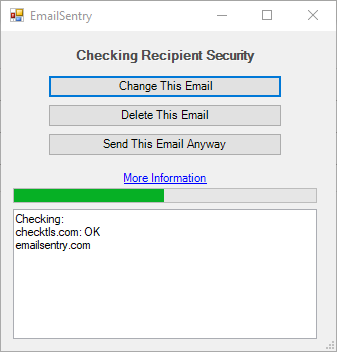
The popup flashes each address being tested and the result.
As long as all of the addresses are secure, the popup disappears and the email is sent.
But, if one or more addresses are not secure, the popup stays visible, stopping the email from sending. It erases the good addresses shows just the insecure addresses:
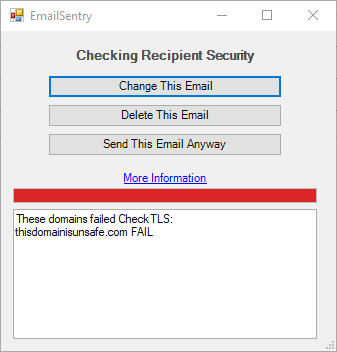
As you can see, the popup lets you choose what to do with this email, now that you know that one or more recipients are not secure.
YourCo Policy on Unsecured Addresses
If the popup finds any unsecured domains, you must review the email carefully to be sure there is no information or data that must be protected. If there is any protected information, you are not permitted to send the email.
You may choose to Delete the message and contact the person(s) another way. Or you may choose to Change the message. This will let you go back and edit out any protected information. When you go to send the message after editing it, you will still receive the warning from EmailSentry, but if you are sure there is no protected information in the email, you may choose to Send it anyway.
Note that our IT department can determine if you used the Send anyway choice on an insecure email address.
Additional information about EmailSentry is available at CheckTLS.com: